Redesign and Improve Korat Adventist International School (KAIS) Website
Executive Summary
The structure and development process for each project is different. For the first project, this project idea starts with a discussion with the current Academic Principal/IT director of KAIS. For the IT aspect of the school, the principal have a desired goal of having a transformation in which achieving a self-sufficient for IT aspect within the school.
As an aspiring product manager, I took the initiative of using this as an idea for developing my first product case study. My goal is to develop a product strategy, wrapped in a proposal for the school as a reference for future development, if the school decided to start transforming.
To help me going through this journey, I used Double Diamond Framework in helping the end-to-end development process of this project.
I started with gathering all initial and important information, which is goes under the DISCOVERY phase in the Double Diamond.
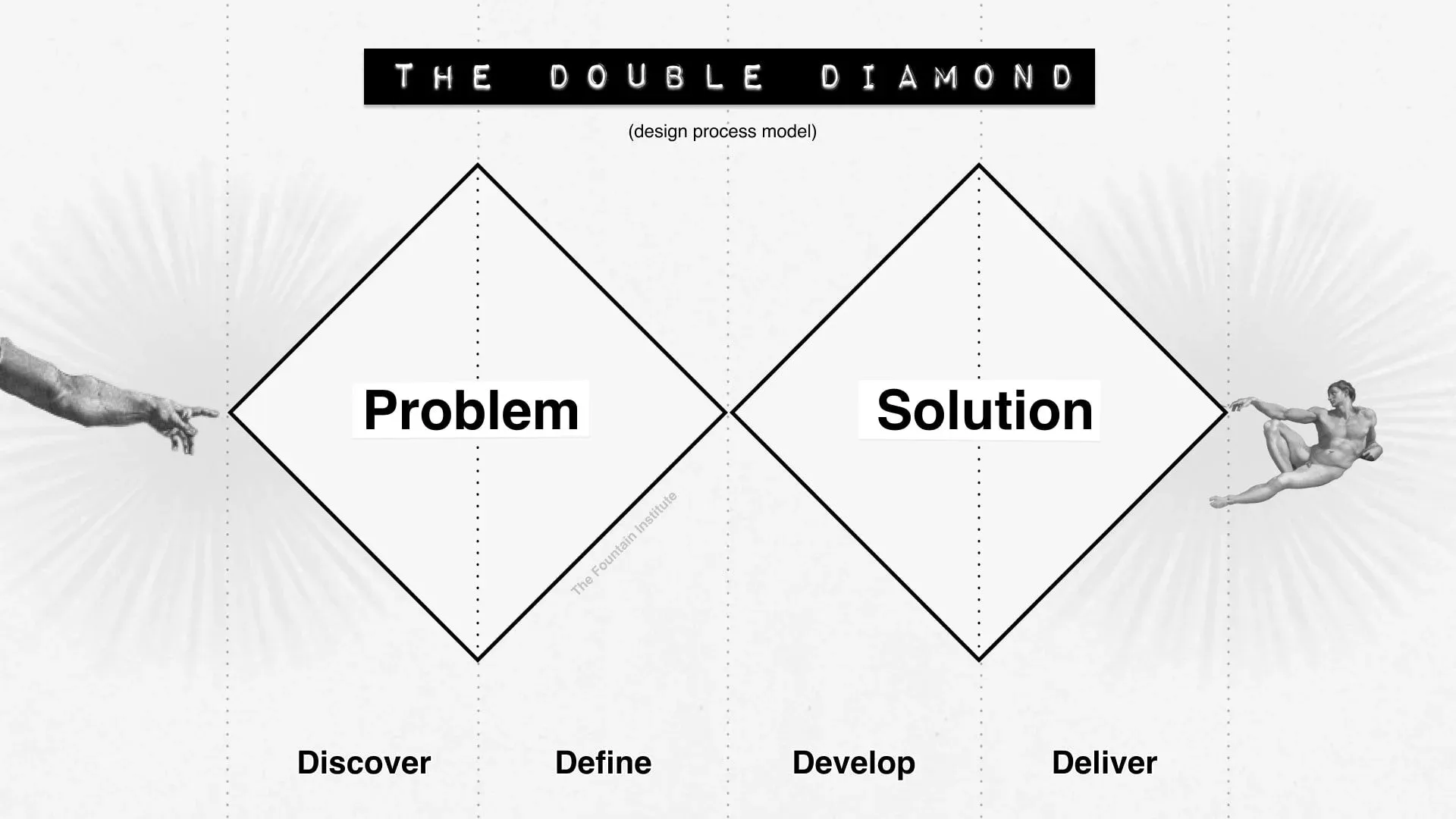 Source: Double Diamond by The Fountain Institute
Project Overview:
-
Context
The official website / landing page of a school plays a critical role in modern digital world as the primary digital touchpoint for both current and prospective parents and students. For international schools in particular, the website often serves as the first source of information for both current and prospective parents exploring enrollment options and school’s program and activities, including admissions procedures, academic programs, school facilities, extracurricular activities, and even about the previous years activity or event photos.
The current website of Korat Adventist International School (KAIS) was developed using WordPress with a provided theme by WordPress back in 2009, when the school is first officially opened. For almost 17 years, while it continues to function as the school’s official online presence, several technological and user experience limitations have become apparent over time.
In a hyper-competitive local market of only 4 international schools in the Korat area, the website served as the primary entry point for the admission funnel. Therefore, proposing to upgrade and redesign current website is not a matter of fixing a broken functions within the school’s system, because this can resulting an unurgent and “can be done later” type of mindset. Instead, to propose the improvement as part of initiative in which can unlock and boost potential new students through this website as the admission funnel.
-
User Segments
To get a clear foundation of the directions and the important problems that need to be highlighted and prioritized, I gathered all key user segments whose currently or are going to use the current website.
- Current parents/students
- Prospective parents/students
- School’s staffs who involved in managing their website.
- IT staff / teacher who has PHP skills in managing WordPress CMS.
- Staffs whose in charge with marketing work.
-
User Problems
I divided user problems into different sections, based on which user and what pain points that they experienced.
External Side:
- Current students/parents pain points:
- Slow, need time to get used to the website information placement, many school’s information such as news, announcements, and activities photos are posted here.
- Prospective parents / students
- Slow, some pages is not fully loaded, keeping the interest between first discover the school’s website until deciding to contact the school through their link / email is a very important flow
Internal Side:
-
School’s staffs
- Currently only one IT teacher/staff who is in charge of managing and maintaining the website and its content.
- There is no specific marketing staff or team in handling content of the website.
- The current flow is that all content updates can only be published through only one IT teacher/staff who has capabilities in using PHP and WordPress, which create a “bottleneck” flow of lead generations from prospective parents/students.
By using Affinity Diagram (https://productschool.com/resources/glossary/affinity-diagram), I summarized and group related pain points into this list:
- Website is slow
- The content is not optimized to load multiple images with high resolution
- Information placement / structure not smooth (information architecture)
- Website attraction is considered low for prospective parents
- Content management flow is bottleneck
To frame the problems that needed to be solve, I shifted from the software engineering lens into product management lens, resulting: ”The school website fails to convert prospective parents into inquiries due to slow performance, outdated UX, and unclear information architecture.”
- Current students/parents pain points:
-
Objectives
The objectives are created in order to bridge and to direct the improvement plan in order to achieve the expected outcomes of this project, and to successfully improve the branding and repositioning KAIS towards more competitive and more appealing within the market of international schools in Korat.
- To use the website as one of important conversion funnel in getting new students.
- To use the website as a strong branding tools that reflects the values and advantages of KAIS
- To reposition within the international schools market in Korat by becoming more competitive through long-term digital transformation journey.
- To reduce complexity and unlock identity and brand effectiveness and efficiencies.
-
Problem Statement
-
Constraints
Before jump in into the product development process, there are some important constraints that was highlighted during my discussion with the current KAIS academic principal.
- Limited resources such as people, time, and budget to improve their current website.
- The mindset of visioning and connecting the website ability and experience for current and prospective parents and students, beyond just improving the website to have “a more nicer” looks. This shifted the website improvement plan as not their main priority.
-
Expected Output and Outcomes
Based on the gathered information above, the expected output of this project is a redesigned website, which are fast, modern, optimized, and reliable.
The expected outcomes are:
- For current students/parents, the experience of a fast, modern, optimized, and ease-to-browse information website.
- For prospective parents, the experience of a fast, smooth, and easy-to-browse information to boost interest for enrolling their children.
- For the school, the ability to remove website content management “bottleneck”.
I learned to avoid Analysis-Paralysis by how to prioritize and to put a side too much unnecessary and indirect issues in order to keep the scope of this project concise and feasible when I have the opportunity to present this as a proposal in helping the school moving towards better functions.
After the DISCOVERY phase is completed, next is the DEFINE phase.
Draft:
- Create user journey for each user segments
- Select which of the journey that really highlights the conversion funnel
- What user and which pages that actually has the flow towards conversion funnel
- Separate into 2 phases (Main priority and secondary priority), in order to create the product road for the development phase.
- Main priority would be the first to be develop, and fast loading time
- Secondary
To be honest, my initial thought before starting the DISCOVER phase was: “Ah, this project should be easy and short. Its just moving from an old tech-stack into a newer, light, and fast tech-stack. The rest would be just drag and drop all contents of the existing website.”
During the DEFINE phase, when I started to work on the MVP, my initial though about only changing the tech-stack compared with what I had done during the DISCOVER phase, was completely different. I learned the hard way that having technical knowledge and skills are really helpful to be come a product manager, but the transition must come along with changing my perspective / mindset into more in the product management lens.
The MVP of this project are focused on:
- What are the minimum addition / revamp needed to support and increase the lead generation (the journey or prospective parents)? This is to address the essential and crucial elements UI (user interface) / IA (information architect) that can improve the conversion and engagement rate.
- A clear value proposition
- MoSCow prioritization features
- Targeted performance optimization (max time to load, mobile-first responsiveness, clean IA, SEO)
To help differentiate, I break into 2 MVP category. 1 is for website as the product, and the other is website as the tech and performance.
PRODUCT MVP:
Must Have:
- The website must have a unified content section that separated from the static / not often changing and the dynamic and often changing.
- This includes the restructure of content categories for better content browsing for the users. Content categories currently are posts, news, announcement, activity and events, achievements, and yearly photos. #InformationArchitecture
- New enrollment flows.
- Event promotion section in the home page
- Includes schedules for each content durations.
- Content Management System that is easy to use for non technical school teachers / staffs.
- Includes Rich Text / Markdown text editor for writing contents.
- Draft ⇒ Accepted ⇒ Published flow for publishing contents.
Will Not Have:
- AI-Chat Bot
- Current chat bot is not working. Upgrading into AI-Chat Bot will not be included in this project.
TECH PERFORMANCE MVP:
Must Have:
- Fast loading time
- Responsive for both web and mobile views
- Images and videos optimization.
- Light and easy to maintain tech-stack
The trade-off:
- What tech-stack that will be implemented. Comparative analysis to show reason of choosing / proposing specific technologies. (To show why this “tech” not just because I have experience of using it, but aligned with the user needs and the defined user problems during the discovery phase).
Based on the MVPs above, below are the proposed solutions:
Product Solutions:
Tech Solutions:
- Rebuild a new website using a modern framework that focuses on performance and responsiveness. The characteristics of this website is not a high interactive web application. Therefore, selecting a static server generated framework is more suitable.
- First Option: Keep using WordPress
- Pros: Pros, Why consider it: No “re-learning curves”. The current IT teacher / staff has experience using this tool. The development phase of this project can be more focused on the product side and lesser for the tech side.
- Cons: Cons: To improve the current performance, information architecture and CMS features, using free to cheap WordPress tools and plugins is not recommended.
- Second Option: Using Next JS
- Pros: Modern and popular framework with many developers using it. Support interactive web application, with multiple options such as SPA, SSR, and SSG.
- Cons: Cons: More suitable for complex SPA and interactive website. Load more JS which inefficient for static page.
- Third Option: Using Astro
- Pros: Modern and new framework that focuses on SSG website. Light and easy to transition from other frontend frameworks.
- Cons: Cons: Need to find developer that can use / learn in a fast pace for low development cost.
- Fourth Option: Using No Code (Framer, Webflow, Wix)
- Pros: Rapid development and deployment. Out-of-the-box visual drag-and-drop editors would completely remove the IT bottleneck, allowing the marketing team to manage everything independently. Hosting and CMS setup are handled entirely by the platform.
- Cons: Introduces recurring monthly/annual subscription costs, which conflicts directly with the school’s strict low-budget constraint. High risk of vendor lock-in, and the underlying code can sometimes become bloated, making it harder to guarantee the < 5 seconds load time required for the lead generation metric.
- First Option: Keep using WordPress
Selected Solution:
Astro
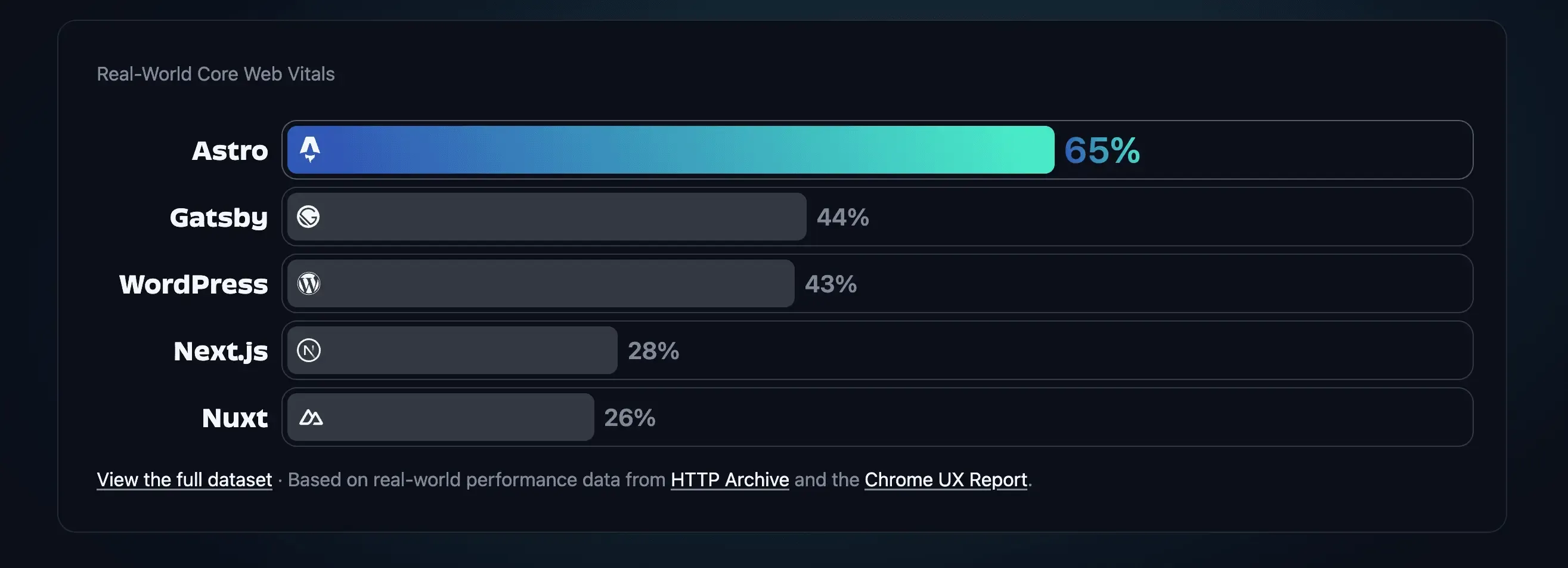
Reasons:
- Not because I have experience / biased to use Astro.
- Astro offers a fast static generated websites, which matches the targeted performance needed for this project.
For CMS selections:
Technical Architecture & CMS Evaluation
To solve the slow loading times (> 5 seconds) and the internal publishing bottleneck, the technology stack must be carefully evaluated against the school’s strict constraints: a low budget, limited technical resources, and the need for non-technical staff to manage content.
While the frontend framework (Astro) guarantees performance, the backend Content Management System (CMS) determines internal usability and operating costs.
1. Traditional CMS vs. Headless CMS
- Traditional CMS (e.g., WordPress)
- Architecture: Frontend and backend are tightly coupled.
- Pros (Usability): Familiar interface for existing IT staff; built-in visual editor out of the box.
- Cons (Performance): Monolithic and heavy. Achieving lightning-fast load times requires expensive hosting and constant plugin maintenance, risking the lead generation metric.
- Headless CMS (Decoupled Architecture)
- Architecture: Backend (content) is separated from the frontend (presentation).
- Pros (Performance): Delivers ultimate speed and flexibility. Pairing a headless CMS with Astro (a static site generator) solves the primary user pain point by enabling nearly instant page loads.
- Cons (Usability): Can introduce complexity for content creators, as headless systems often lack 1:1 visual previews out of the box.
Decision: A decoupled Headless CMS architecture is necessary to hit performance metrics, but we must solve the complexity trade-off for the marketing team.
2. Evaluating Headless Types: API-Driven vs. Git-Based
- API-Driven Headless CMS (e.g., Contentful, Sanity)
- How it works: Content lives in a cloud database and is fetched via API.
- Trade-off: Highly scalable and robust, but introduces monthly subscription fees for database hosting and user seats. This violates the school’s strict low-budget constraint.
- Git-Based Headless CMS (e.g., standard Markdown files)
- How it works: Content is saved as flat Markdown (
.md) files directly within the GitHub repository. - Trade-off: Zero database costs (perfect for the budget), but plain Markdown files are highly intimidating for non-technical staff. This fails the internal usability goal and maintains the IT bottleneck.
- How it works: Content is saved as flat Markdown (
3. The Recommended Solution: Git-Based CMS with Visual Editing
To bridge the gap between necessary engineering performance (Astro) and the required internal user experience (No-code editing), the selected solution is a Git-Based CMS with a Rich Text Visual Interface (e.g., Keystatic or TinaCMS).
- Fixes the IT Bottleneck (Usability): The marketing team gets a modern, Word-like interface to drag-and-drop images, format text, and preview content independently.
- Aligns with Budget (Cost): When the user hits “Save”, the CMS automatically commits Markdown directly to GitHub in the background. Hosting costs remain at $0.
- Maximizes North Star Metric (Performance): Astro compiles these local Markdown files into purely static HTML, ensuring the fast load times necessary to increase prospective parent conversions.
Anticipated Trade-offs:
- Publishing Delay: Unlike WordPress, hitting “Publish” triggers a background build process. The marketing team will require minor training to expect a ~2-minute delay before changes appear live.