IMPORTANT NOTE: This case study is developed solely for learning and exploration purposes and is not intended to misrepresent or affect KAIS’s reputation.
Executive Summary
The structure and development process for each project is different. This project began with a direct discussion with the current Academic Principal and IT Director of KAIS. From an IT perspective, the principal expressed a clear desired goal: achieving self-sufficiency in the school’s IT operations through a structured digital transformation.
As an aspiring product manager, I took the initiative to use this as the foundation for my first product case study. My goal was to develop a product strategy wrapped in a formal proposal for the school to serve as a reference document for future development if the school decided to move forward with its transformation.
To guide me through this process, I applied the Double Diamond Framework to structure the end-to-end development of this project.
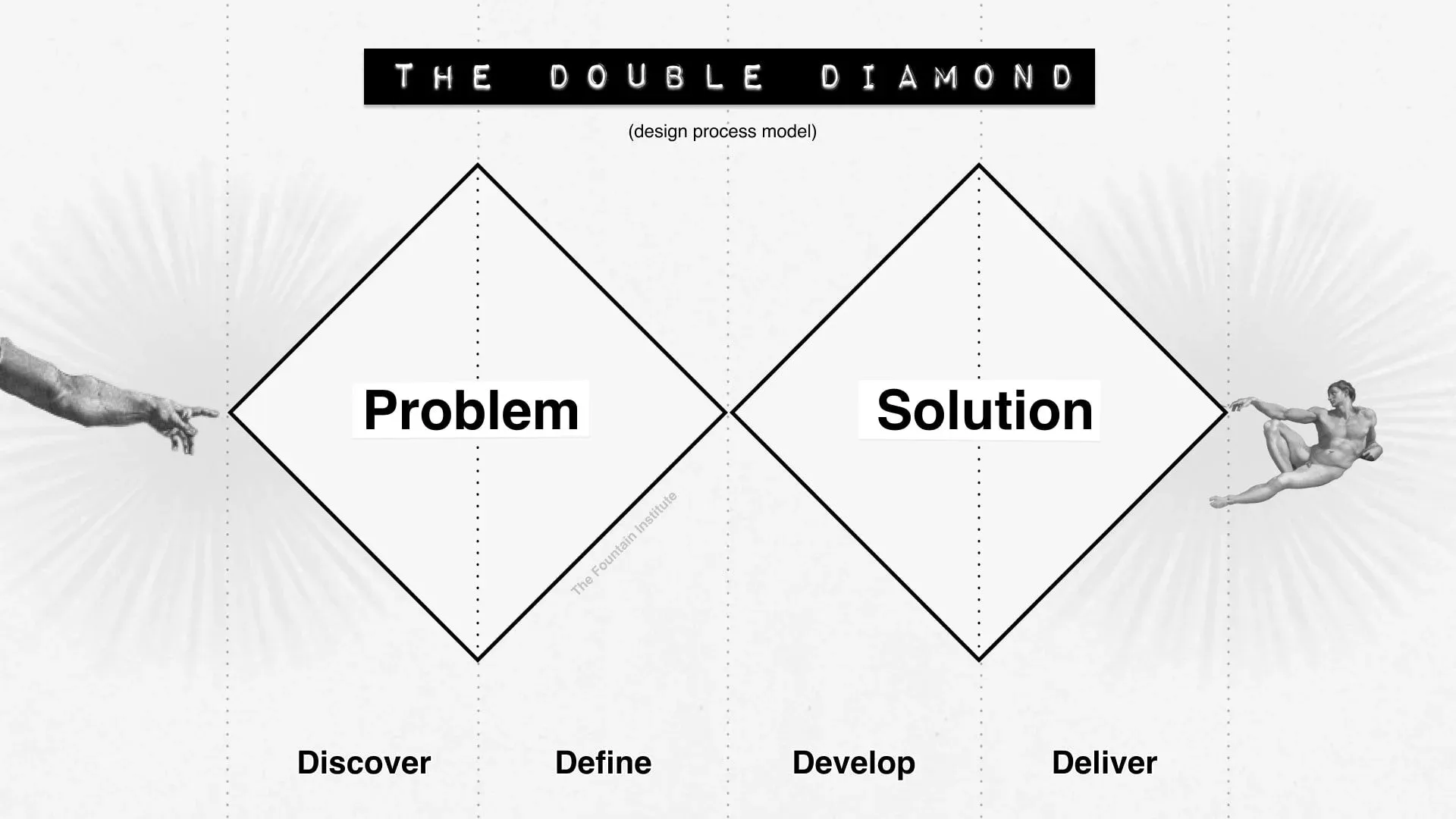 Source: Double Diamond by The Fountain Institute
Phase 1: DISCOVER
1. Context
The official website of a school plays a critical role in today’s digital world. It is the primary digital touchpoint for both current and prospective parents and students. For international schools in particular, the website often serves as the first source of information for families exploring enrollment options, academic programs, school facilities, extracurricular activities, and past event documentation.
The current website of Korat Adventist International School (KAIS) was built using WordPress with a default theme dating back to 2009, the year the school was first officially opened. For nearly 17 years, while it has continued to function as the school’s official online presence, several technological and user experience limitations have become increasingly apparent.
In a hyper-competitive local market of only four international schools in the Korat area, the website serves as the primary entry point of the admission funnel. Therefore, proposing a website upgrade must not be framed as simply “fixing something broken” that framing risks producing an “it can wait” response from leadership. Instead, this improvement must be positioned as an initiative that can directly unlock and boost prospective student acquisition by optimizing the website as a conversion funnel.
2. User Segments
To establish a clear foundation for prioritization, I identified all key user segments who currently use or will use the website:
- Current parents and students > primarily seeking news, announcements, event updates, and activity photos.
- Prospective parents and students > exploring the school for the first time and evaluating whether to initiate contact or begin enrollment.
- School staff involved in website management:
- IT staff/teachers with PHP skills who manage the WordPress CMS.
- Staff responsible for marketing and content publication.
3. User Problems
I divided user problems into external and internal categories, based on who was affected and what pain points they experienced.
External Side:
- Current students and parents: The website is slow and requires effort to navigate. Key information such as news, announcements, and activity photos is difficult to locate due to unclear structure.
- Prospective parents and students: The website is slow, and certain pages fail to load completely. Maintaining a prospective parent’s interest from the moment they first discover the school’s website through to the decision to make contact, is a critical and fragile journey that the current site does not support well.
Internal Side:
- Currently, only one IT teacher/staff member is responsible for managing and maintaining the website and all of its content.
- There is no dedicated marketing staff or team to handle website content.
- All content updates must pass through the single IT staff member who has the technical capability to manage WordPress with PHP, creating a significant bottleneck in the content pipeline and, by extension, in lead generation from prospective families.
Using an Affinity Diagram to group related pain points, the consolidated list of problems is:
- Website performance is slow
- Content (particularly high-resolution images) is not optimized for the web
- Information architecture is unclear and makes navigation difficult
- The website’s visual appeal is insufficient to attract or retain prospective parents
- Content management flow is bottlenecked through a single person
Shifting from a software engineering lens to a product management lens, the problem can be framed as:
The school’s website fails to convert prospective parents into inquiries due to slow performance, outdated UX, and an unclear information architecture.
4. Objectives
The following objectives were defined to bridge the gap between the current state and the expected outcomes of this project, ultimately supporting KAIS in becoming more competitive and appealing in the Korat international school market:
- Conversion: Use the website as a key conversion funnel for acquiring new students.
- Branding: Use the website as a strong branding tool that clearly reflects the values and competitive advantages of KAIS.
- Market positioning: Reposition KAIS as a modern, competitive school within the local international school market through a long-term digital transformation.
- Operational efficiency: Reduce internal complexity and remove the content management bottleneck to unlock brand effectiveness.
5. Problem Statement
After synthesizing insights from the discovery phase, I arrived at the following problem statement:
KAIS’s current website, built on a 17-year-old WordPress infrastructure, is failing to serve both its external and internal users. Externally, slow load times and unclear information architecture are causing prospective parents to disengage before making contact directly reducing enrollment inquiry rates in an already competitive four-school local market. Internally, a single-person dependency for all content updates creates a publishing bottleneck that prevents timely and consistent communication with both current and prospective families. The school needs a fast, modern, and independently manageable website that functions as an active enrollment conversion tool, not just a passive information archive.
How Might We (HMW) statements:
- HMW redesign the website so that prospective parents can quickly find and understand the school’s value proposition?
- HMW enable non-technical staff to publish and update content without depending on IT?
- HMW reduce page load time so that first-time visitors experience a smooth, trust-building journey from discovery to inquiry?
6. Constraints
Before moving into the product development phase, several important constraints were identified during my discussion with the KAIS Academic Principal:
- Limited resources: The school has a restricted budget, a small team, and limited time to dedicate to a website overhaul.
- Mindset gap: The current leadership views the website improvement primarily as a cosmetic change (“making it look nicer”) rather than as a strategic business tool. Bridging this mindset gap was an important part of framing the proposal.
- Technical dependency: There is no in-house developer other than the one IT staff member, which limits the complexity of any solution that requires ongoing technical maintenance.
- Change management: Any new system must have a low learning curve for non-technical staff to be adopted sustainably.
I learned to avoid analysis paralysis by keeping the project scope concise and feasible setting aside indirect or lower-priority issues to focus on what would have the greatest impact within real constraints.
7. Expected Outputs and Outcomes
Based on the gathered information above, the expected output of this project is a redesigned website that is fast, modern, optimized, and reliable.
The expected outcomes are:
- For current students and parents: A fast, modern, easy-to-navigate website where school information including news, announcements, and event photos, is clearly structured and simple to browse.
- For prospective parents: A smooth, compelling, and fast-loading digital experience that sustains engagement from first discovery through to enrollment inquiry.
- For the school: The removal of the content management bottleneck, empowering non-technical staff to independently publish and manage website content.
Phase 2: DEFINE
Before starting this phase, I want to share an honest reflection: my initial assumption going into this project was “this should be easy, it’s just swapping out a slow tech stack for a faster one and moving the content over.” The DEFINE phase quickly corrected that assumption. Having a technical background is genuinely helpful for a product manager, but this project taught me that technical skills must be paired with a deliberate shift in mindset toward product thinking. The two are not the same.
1. User Journey Mapping
I created user journey maps for each of the identified user segments, tracing their interactions with the website from first touchpoint to their desired end state. This allowed me to identify the stages with the highest drop-off risk and the most critical moments of engagement.
The two most strategically significant journeys were:
- Prospective parent journey > from first discovering KAIS online, browsing the website, evaluating the school, to submitting an inquiry or initiating contact. This journey directly feeds the admission funnel.
- Internal content manager journey > from drafting an announcement or event update, through internal review, to publishing it live on the website.
2. Prioritization: MVP Phasing
Based on the user journeys, I separated deliverables into two phases using a MoSCoW prioritization framework:
- Phase 1 (Main Priority): Features and improvements that directly support the prospective parent journey and the conversion funnel. These are the highest-impact, time-sensitive improvements.
- Phase 2 (Secondary Priority): Features that improve the experience for current families and internal staff efficiency, but are not blocking the core conversion goal.
3. Minimum Viable Product (MVP)
The MVP is scoped around two dimensions: the website as a product and the website as a technical platform.
PRODUCT MVP
Must Have:
- A unified and restructured content architecture that separates static content (e.g., About, Programs, Admissions) from dynamic content (e.g., News, Events, Activity Photos, Achievements). This directly addresses the information architecture pain point and improves browsing clarity for all user segments.
- A redesigned enrollment/admissions flow with a clear call-to-action that guides prospective parents from interest to inquiry in as few steps as possible.
- An event and news promotion section on the homepage, with a defined content schedule so that the website always appears active and current.
- A Content Management System (CMS) that is accessible to non-technical staff, including:
- A rich text / visual editor (no coding required)
- A Draft → Review → Published workflow for content governance
- Role-based access so that multiple staff members can contribute independently
Should Have:
- SEO metadata management for each page and post
- A contact/inquiry form directly on the admissions page
- A photo gallery section for annual activity documentation
Will Not Have (Out of Scope for MVP):
- AI Chatbot: The current chatbot is non-functional. Upgrading to an AI-powered chatbot introduces cost, complexity, and maintenance overhead that is misaligned with the school’s current constraints. This will be revisited in a future phase.
- Complex interactive features (student portals, online payment, etc.)
TECH PERFORMANCE MVP
Must Have:
- Page load time under 5 seconds on a standard mobile connection (target: Core Web Vitals “Good” threshold)
- Fully responsive design for both desktop and mobile
- Image and media optimization (compression, lazy loading, modern formats like WebP)
- A lightweight, easy-to-maintain tech stack with minimal ongoing cost
North Star Performance Metric:
Time-to-First-Meaningful-Paint ≤ 3 seconds on mobile (4G connection), directly correlated with prospective parent engagement and inquiry conversion rate.
4. Technology Trade-off Analysis
Selecting the right tech stack required balancing four competing constraints: performance, cost, usability for non-technical staff, and maintainability with limited developer resources.
Frontend Framework Options
| Option | Pros | Cons | Verdict |
|---|---|---|---|
| WordPress (current) | No re-learning curve; existing IT staff is familiar with it | Heavy and slow by default; achieving performance targets requires expensive hosting and plugin maintenance | ❌ Rejected |
| Next.js | Modern, popular framework with large community; supports SSG, SSR, and SPA | Overkill for a mostly static site; loads unnecessary JavaScript, which hurts performance for static pages | ❌ Rejected |
| Astro | Purpose-built for static site generation; ships zero JS by default; lightweight and fast | Smaller developer community; requires finding a developer willing to learn or already familiar with it | ✅ Selected |
| No-Code (Framer / Webflow / Wix) | Fastest to build; removes IT bottleneck entirely with visual drag-and-drop editors | Introduces recurring subscription fees that conflict with the school’s low-budget constraint; vendor lock-in risk | ❌ Rejected |
Why Astro was selected:
Astro was not chosen simply because I have experience with it. The selection is grounded in the constraints of this project:
- Performance alignment: Astro ships zero JavaScript to the browser by default, producing purely static HTML. This directly addresses the primary user pain point (slow page loads) and is the most reliable path to hitting the ≤ 5-second load time metric without expensive infrastructure.
- Cost efficiency: Astro static sites can be hosted for free on platforms like Netlify or Vercel, aligning with the school’s strict low-budget constraint.
- Maintainability: Astro’s component model is straightforward and can be picked up quickly by a developer familiar with HTML/CSS or any modern frontend framework, reducing long-term technical risk.
- Right-sized complexity: Unlike Next.js, Astro does not load a heavy JavaScript runtime for pages that do not require interactivity which describes the majority of this website’s content.
5. Technical Architecture & CMS Evaluation
To solve the slow loading times (> 5 seconds) and the internal publishing bottleneck, the technology stack must be evaluated against the school’s strict constraints: a low budget, limited technical resources, and the need for non-technical staff to manage content independently.
While the frontend framework (Astro) guarantees performance, the CMS determines internal usability and operating costs.
Traditional CMS vs. Headless CMS
Traditional CMS (e.g., WordPress)
- Architecture: Frontend and backend are tightly coupled.
- Pros: Familiar interface for the existing IT staff; built-in visual editor out of the box.
- Cons: Monolithic and heavy. Achieving fast load times requires expensive hosting and constant plugin maintenance, directly threatening the lead generation metric.
Headless CMS (Decoupled Architecture)
- Architecture: The content backend is fully separated from the presentation frontend.
- Pros: Delivers maximum performance and flexibility. Pairing a headless CMS with Astro enables near-instant page loads.
- Cons: Can introduce complexity for content editors, as headless systems do not always provide real-time visual previews out of the box.
Decision: A Headless CMS architecture is necessary to meet performance targets, but the usability trade-off for the marketing team must be explicitly solved.
Headless CMS Types: API-Driven vs. Git-Based
API-Driven Headless CMS (e.g., Contentful, Sanity)
- Content lives in a cloud database, fetched via API at build time.
- Highly scalable and provides a polished editorial interface.
- Trade-off: Introduces monthly subscription fees for database hosting and user seats. This conflicts directly with the school’s low-budget constraint.
Git-Based CMS (plain Markdown files)
- Content is stored as
.mdfiles directly within the GitHub repository. - Zero database cost, perfectly aligned with the budget constraint.
- Trade-off: Plain Markdown files are intimidating and inaccessible for non-technical staff, maintaining the IT bottleneck.
Recommended Solution: Git-Based CMS with Visual Editing Layer
To bridge the gap between performance engineering requirements (Astro) and internal usability requirements (no-code editing), the selected solution is a Git-Based CMS with a Rich Text Visual Interface, specifically Keystatic or TinaCMS.
How it solves each constraint:
| Constraint | Solution |
|---|---|
| IT bottleneck | Marketing staff get a modern, Word-like interface to write content, add images, and publish independently, no PHP or developer involvement needed |
| Low budget | When the user clicks “Save,” the CMS automatically commits Markdown to GitHub in the background. Hosting and storage cost: $0 |
| Performance | Astro compiles those Markdown files into pure static HTML at build time, ensuring fast load times that directly support prospective parent conversion |
| Maintainability | Git history provides a full audit trail of all content changes with no database to manage or back up |
Known Trade-off to Manage:
Unlike WordPress (where “Publish” is instant), this architecture triggers a background build-and-deploy process that takes approximately 2 minutes before changes appear live. This is a minor operational adjustment, not a technical flaw. The marketing team will need brief onboarding to set the right expectation: “Save and publish your content will be live within two minutes.”
Summary: Proposed Solution Stack
| Layer | Selected Tool | Rationale |
|---|---|---|
| Frontend Framework | Astro | Zero-JS static output; best-in-class performance for content-focused sites |
| CMS | Keystatic / TinaCMS | Git-based with visual editor; zero cost; removes non-technical bottleneck |
| Hosting | Netlify / Vercel | Free tier supports static sites; global CDN; automatic deploys on content save |
| Media Optimization | WebP format + lazy loading | Addresses high-resolution image performance issues identified in discovery |
Key Learnings
-
Reframing the problem is the most important PM skill. The school’s initial mindset was “our website looks old.” Reframing it as “our website is failing to convert prospective parents into inquiries” changed the entire conversation from cosmetic to strategic.
-
Constraints are not obstacles; they are design inputs. The budget constraint ruled out no-code tools and API-driven CMSs. The technical resource constraint ruled out complex frameworks. Working within these constraints led to a more creative and appropriate solution than an unconstrained approach would have.
-
Tech skills help, but product thinking is a separate discipline. Understanding how Astro works made it easier to evaluate trade-offs, but the instinct to jump straight to a technical solution without defining the product MVP first was a trap I had to consciously step out of.
-
Avoiding analysis paralysis requires deliberate scoping. There were many related problems that could have expanded this project indefinitely. Staying focused on the prospective parent conversion journey as the primary scope kept the proposal feasible and actionable.